
Back in April 2024, Valve finally gave Counter-Strike 2 players something we had been begging for since launch: a left hand viewmodel. I remember the CS:GO days when cl_righthand 0 was just a console command away. In CS2, at first, it felt like that freedom was gone. But then the April 25 patch dropped, and suddenly I could swap hands without touching a config file. Fast forward to 2026, and the left hand viewmodel is just part of my daily CS2 routine. If you are still playing with the default right hand because you do not know how to change it, let me walk you through it.
Why I Use the Left Hand Viewmodel
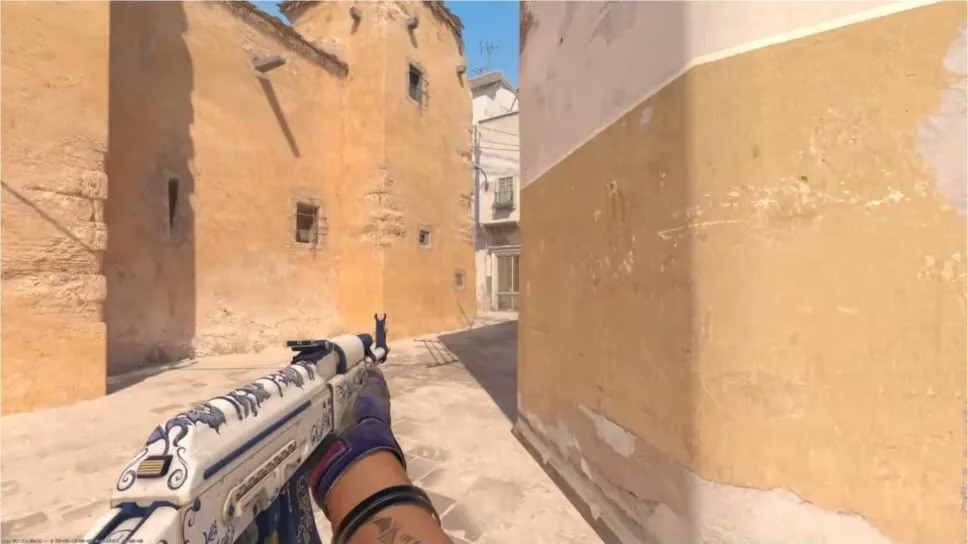
I am not going to pretend that left hand viewmodel makes me a pro. It does not. But it does help me in specific situations. When I am holding an angle on the right side of a wall, a left hand viewmodel can give me a slightly better view of what is coming. It also feels more natural when I am peeking to my left. Some players say it is placebo. Maybe it is. But after thousands of hours, comfort matters. And in CS2, comfort is often the difference between a clean spray and a whiff.
The best part? Valve did not just add a hidden console command. They added a proper setting and a keybind. That means you can change your preferred hand in the menu, and you can also swap on the fly during a match.
How to Set Your Preferred Viewmodel Hand
Here is the exact path I use in 2026. It has not changed since the April 25, 2024 patch.
-
Open Counter-Strike 2.
-
Go to the game's Settings.
-
Select the Game submenu.
-
Navigate to the Item section.
-
Find the Preferred Viewmodel Left/Right Handedness option.
-
Select either Right or Left for your CS2 viewmodel.
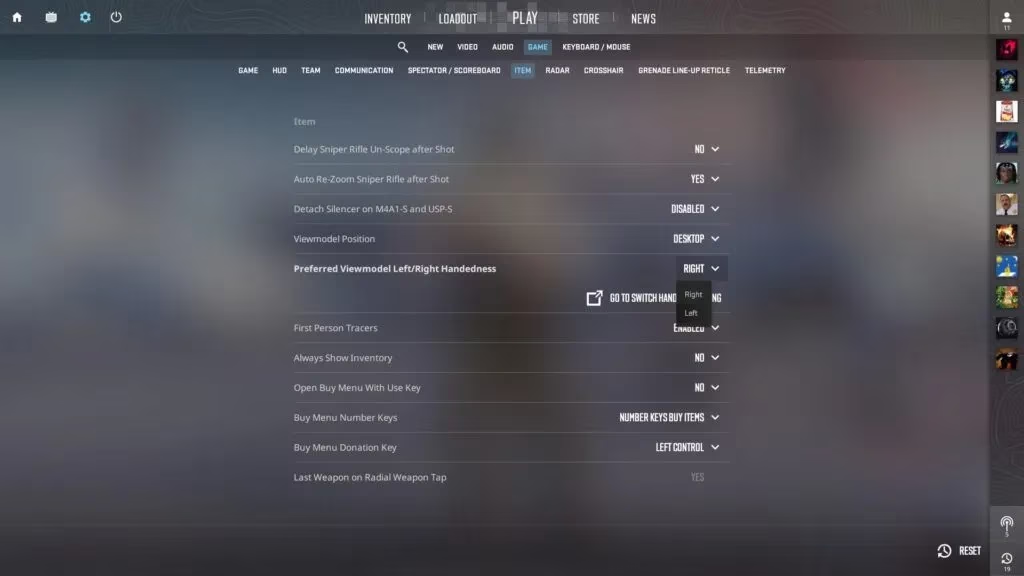
That is it. No config file. No launch options. No drama. I usually set mine to left, but I know plenty of players who keep it on right and only swap situationally.
How to Bind the Switch Viewmodel Key
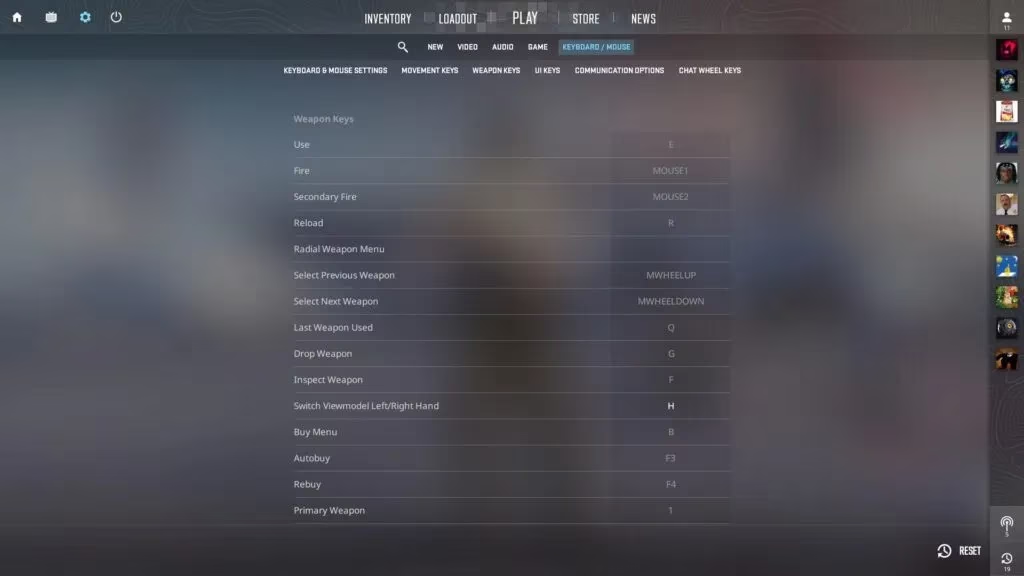
Setting a preferred hand is great, but the real magic is the temporary swap. You can bind a key to switch between left and right viewmodel during gameplay. This is perfect for peeking around corners or clearing angles. Here is where to set it:
-
Open Counter-Strike 2.
-
Go to the game's Settings.
-
Select the Keyboard/Mouse submenu.
-
Navigate to the Weapon Keys section.
-
Find the Switch Viewmodel Left/Right Hand option.
-
Enter the keybind you would like to use.
The default is the US keyboard letter H. I keep it on H because it is easy to reach with my thumb. Some players use a mouse button, but I prefer a keyboard key. It is all about muscle memory.
The April 25 Patch Was More Than Just Hands
The left hand viewmodel was the headline, but the April 25, 2024 release notes were stacked. I remember reading them and thinking, Valve actually cooked. Here is a quick rundown of what else changed, because many of these features are still in the game in 2026.
| Category | Changes |
|---|---|
| Viewmodel | Adjusted viewmodel bob movement. Added Preferred Viewmodel Left/Right Handedness. Added Switch Viewmodel Left/Right Hand key binding (default H). Viewmodel position and left/right hand state are now networked and visible to first-person spectators. Deprecated Couch viewmodel position setting. |
| HUD | Added Radar Map Alternate Zoom setting and Toggle Radar Zoom key binding. Added a radar icon for the local player when free cam spectating. Added a grenade line-up reticle that appears shortly after pulling the pin. Changed weapon Swap text to always show the gameplay name. Added a kill feed icon for in-air kills. Added the scoreboard to the ESC menu. Added an icon to indicate bots on the scoreboard. |
| Buy Menu | Added a Dropped Weapons panel for teammates' weapons in the buy zone. Added the minimum amount of money guaranteed next round to the buy menu title bar. |
| Gameplay | Increased Zeus movement speed and adjusted the attack cone. Increased Zeus kill reward from $0 to $100 ($50 in Casual). Increased CZ75-Auto kill reward from $100 to $300 ($150 in Casual). Reduced XM1014 kill reward from $900 to $600 ($300 in Casual). |
| Inventory | Lighting adjustments in Inspect background maps. Added Wear Category to the info tooltip. Added gameplay name in panels that used to only show customized name. |
| Maps | Replaced Overpass with Dust 2 in Active Duty, competition map pool, and Premier. Baggage: opened roll-up doors at spawns, updated conveyor models, solidified stairs, bug fixes. Inferno: removed overhanging building at top mid, removed overhangs at bottom of banana, map tweaks. Overpass, Nuke, Vertigo, Mirage, and Office: bug and exploit fixes, collision and line of sight adjustments, minor performance improvements. |
| Weapon Finishes | AK-47 | Inheritance: texture and mask adjustments. USP-S | Jawbreaker: corrected ambient occlusion texture. |
| Miscellaneous | Decoupled demo playback camera movement from playback speed. Added ability to launch practice matches and workshop maps with party members. Added Overwatch system for match demo review by trusted partners. Copenhagen 2024 Major sticker capsules on sale for 75% off. Added ability to adjust brightness in windowed modes. |
What Still Matters in 2026
A lot has changed since 2024. CS2 has had more updates, more maps, and more meta shifts. But the left hand viewmodel is still one of those quality-of-life features I use every session. The keybind is still H for me. The preferred handedness setting is still in the same menu. And the temporary swap still helps me when I am holding a tight angle.
If you are a returning player, do not overthink it. Set your preferred hand, bind the swap key, and play a few deathmatches. You will know within ten minutes whether left hand feels right for you. And if it does not, you can always switch back. That is the beauty of it.
So, what is my verdict? The left hand viewmodel is not a game-changer in the way a new map or a weapon balance patch is. But it is a player-choice feature, and those are the ones that make a game feel like yours. In 2026, I am glad Valve finally listened. Now if you will excuse me, I have a Dust 2 match to queue for. I will be peeking left with my left hand out. 🎯